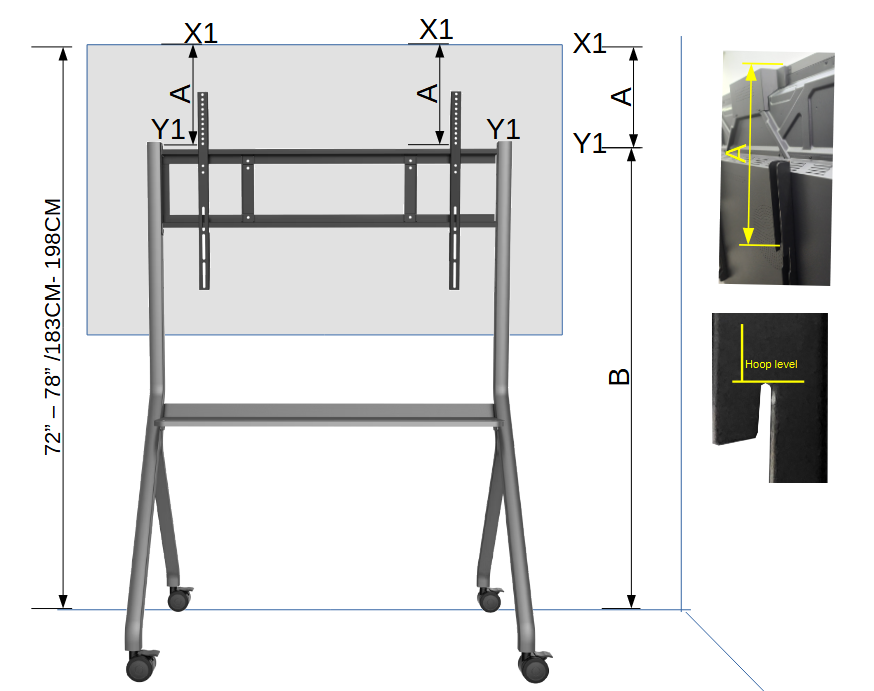
Determine the Desired Viewing Height (X1):
Decide on the appropriate height for the top of the panel, typically between 72” to 78” (183 cm to 198 cm), and mark this height as X1.
Calculate Bracket Position (Y1):
Subtract A (panel height) from X1 to determine the correct mounting height on the mobile stand. Mark this as Y1.
Secure the Bracket:
Tighten all screws and fasteners to secure the mounting plate to the mobile stand. Confirm the bracket is level and stable.
Mount the Panel:
With the help of 1–2 people, carefully lift and hook the panel onto the mounting bracket of the stand.
Connect the Modules:
Insert the computer module into the panel.
Insert the wireless module.
Plug in the Power Cord:
Connect the power cord from the panel to a power outlet.
Power On and Setup:
Turn on the panel and follow the on-screen instructions to complete the setup process.
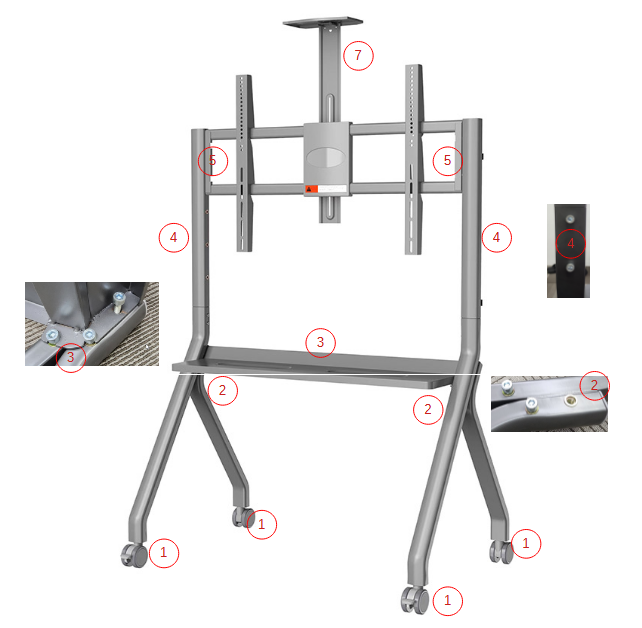
Fix all 4 wheels onto the two legs securely.
Screw 2 screws into each leg to attach the stand, but leave a 5 mm gap before fully tightening.
Insert the tray between the legs and secure it using the 3rd screw on each side.
Insert the mounting bar, ensuring the screw holes face inward, and loosely insert the screws.
Attach the mounting plate to the bar.
Once all parts are in place, tighten all screws securely.
Note: The video camera holder is not required and does not need to be installed.

Measurement tape
Cutter or scissors
Views: 43